What is a frame?
A frame is a single image the GPU renders and displays on your screen. When you play a game at 60 frames per second, the GPU is producing 60 of these images every second - that's a budget of roughly 16 milliseconds per frame to do all the work: process geometry, run shaders, and output pixels. Drop below that budget and you get framerate drops. Understanding frames is the foundation of understanding rendering performance.
What is a shader?
A shader is a piece of code that runs on the GPU and decides what color to render the pixels on your screen with the use of math. There are different types of shaders, each with its own quirks and uses. While coloring pixels with colors sounds like a mundane task, the more you learn the more you realize it's like doing magic.
The term “shader” was coined by Pixar in version 3.0 of their RenderMan Interface Specification in 1988.
Why do we need shaders?
We can use C# script to modify the color of the pixels, but shaders are a better option due to the sheer number of pixels on the screen. Modern displays, such as retina displays, have a resolution of 2880x1800 and update over 311 million pixels every second at 60 frames per second, a task that cannot be efficiently handled by a conventional CPU alone. In contrast, GPUs have numerous small processors that can operate concurrently, making them better equipped to handle this high volume of calculations. Thruther more, the GPU has been optimized for executing multiple operations simultaneously, making it well-suited for the mathematical computations required by shaders.
What does a shader draw?
Shaders draw 3d objects. These 3d objects are comprised of many points called vertices. The vertices together make up a Mesh. In order to draw the 3d object the shader needs information on each vertex and it also needs the shader properties which are in the material that the 3d object has.
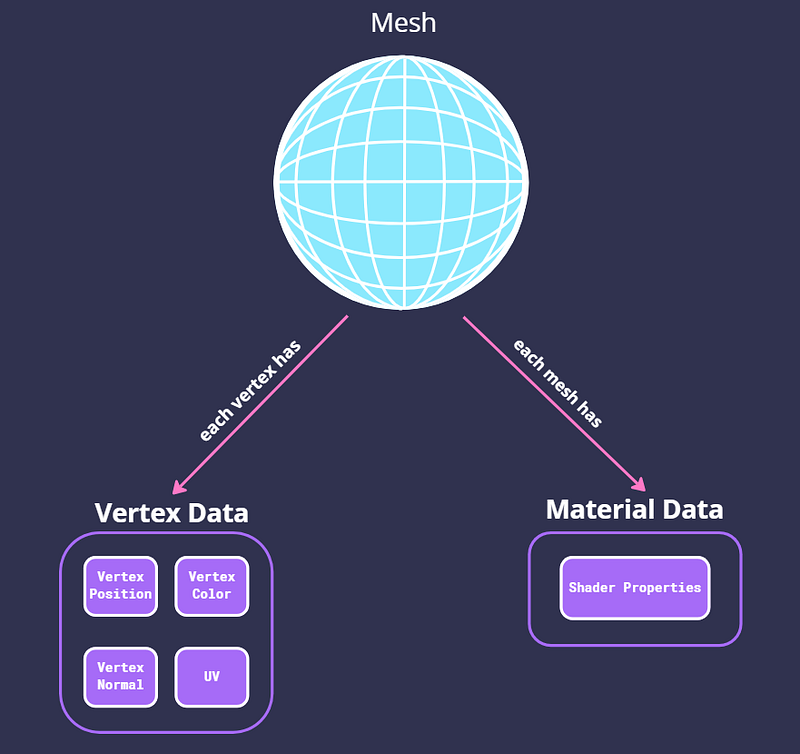
What data does a vertex have?
The Vertex is comprised of a Vertex Position, Vertex Color, Vertex Normal, and UV.
- Vertex position - The x, y, and z coordinates of the vertex in the world.
- Vertex Color - Holds a color for the vertex though it can be used for other shader tricks.
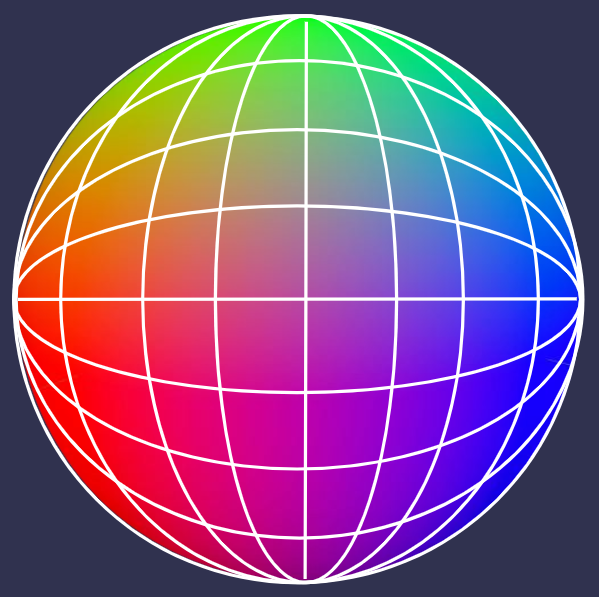
- Vertex Normal - Each vertex has a vector that tells us the direction that that vertex is looking at. Since vectors are composed of x,y, and z values we can translate them to R.G.B values and display them as colors:
- UV - is a set of coordinates for mapping a 2D texture onto a 3D object. This is achieved by mapping each vertex of the 3D object to a specific location on the texture. The UV coordinates range from (0,0) to (1,1) and define the position of a vertex on the texture. The name “UV Mapping” comes from the use of the letters “U” and “V” to denote the axes of the 2D texture. This is because the axes of the 3D object are already defined as “X”, “Y”, and “Z” in model space, and “W” is used for calculating quaternion rotations, a common operation in computer graphics.
What Is A Material?
A material’s relationship to a shader is similar to the relationship between a class and an object in object-oriented programming. The material contains the parameters for the shader, and one shader can be associated with multiple materials. Every 3D model in Unity has a material, which can consist of various properties such as textures or vectors, as defined in the shader.
What Is the queue on the material?

The render queue in Unity determines the order in which objects are drawn in the scene. Objects are drawn from lowest to highest render queue value, allowing for control over the draw order and achieving various visual effects:
- Background (1000) - Used for skybox and backgrounds.
- Geometry (2000) - Opaque geometry uses this queue.
- AlphaTest (2450) - Alpha-tested geometry uses this queue. Shaders that don’t write to the depth buffer should go here (glass, particle effects).
- GeometryLast (2500) - Last render queue that is considered “opaque”.
- Transparent (3000) - This render queue is rendered after Geometry and AlphaTest, in back-to-front order.
- Overlay (4000) - This render queue is meant for overlay effects, e.g. lens flares.
We can also categorize the queues as opaque and transparent. Opaques are objects that have no transparency like walls and solid objects. Transparent is for things with an alpha value that can be seen through. This has important implications.
In opaque geometry, anything rendered between 0–2500 is rendered front to back, this way the ZTest is rejecting pixels where the depth has already been written to.
The Transparent geometry, anything between 2501–5000 is rendered back to front, this is to get proper blending. This works like a Bob Ross painting, where he first draws the mountains then the trees then the lake this is called the painter’s algorithm. For this reason, it is more performant to draw opaque objects.
What is overdraw?
What Is a sorting order?

You might have noticed that canvases in unity have sorting order. If you’ll look closely you'll see that renderers also have this Renderer.sortingOrder. The sorting order is another step in the order of rendering. Things are drawn from the lowest to the highest order of that queue. So an object of sorting order 1 on queue 3000 will be drawn before an object of sorting order 12 on queue 3000, but an object of sorting order 33 on queue 3000 will be drawn before an object of sorting order 2 on queue 3003.
How does the GPU know that it needs to use a shader to draw something?
In a previous post I explained this, but ill recap. In each frame draw calls are requested between the CPU to the GPU. The draw call contains the vertex data and the shader properties of the object that needs to be drawn. some times several of these calls are batched and sent together.
Shader Object - A Shader object is a Unity-specific way of working with shader programs; it is a wrapper for shader programs and other information. It lets you define multiple shader programs in the same file, and tell Unity how to use them.
Types Of Shader Programs
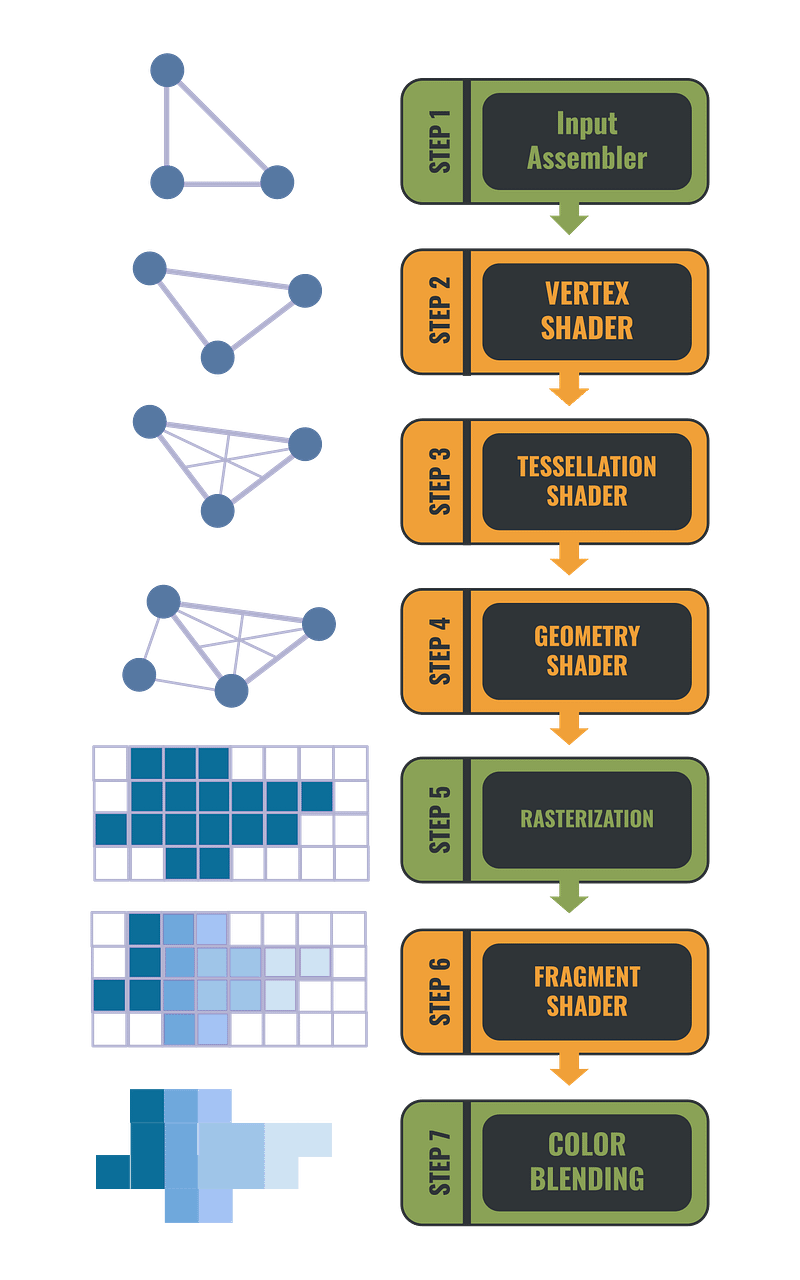
Vertex shader - All the data about the mesh that needs to be rendered is passed to the vertex shader also known as the vertex function. The vertex shader is responsible for the calculation of the vertex position in screen space. It can manipulate the mesh data for creating special effects. It can change the mesh position, color, vertex Normals, and texture mapping.
Tessellation shaders - Are used to improve the quality of geometry by subdividing meshes according to rules. This is used to improve the look of things when you get up close to them like floors and walls.
Geometry shader - The geometry shader is the step between the vertex shader and the fragment shader. It receives the vertex data and then allows you to manipulate it by generating new vertices or removing existing ones. This is used in cases like the generation of grass or fur. Note that geometry shaders have notoriously bad performance and are rarely used anymore.
Fragment shader - The fragment shader is the last stage of the shader programs, it is also known as the pixel shader. It runs on each fragment that has a polygon covering it and chooses what color to display.
Compute shader - Compute shaders are unique in the fact that they can run outside the rendering pipeline. So they can be used to do calculations in parallel using the GPU power.
The Languages
ShaderLab - A declarative language that you use in shader source files. It uses a nested-braces syntax to describe a Shader object.
HLSL - In Unity shaders are written in High-Level Shading Language or HLSL for short. HLSL was developed by Microsoft for their Direct3D 9 API. Even though this is the language used in Unity it’s good to know that there are other shader languages such as GLSL which was created for OpenGL, and others.
The Visual Language
In Unity 2019+ if you use the URP or HDRP you have the choice of using Shader Graph. Shader Graph is a visual scripting tool that lets you write shaders visually without complex syntax. While Shader Graph is missing features and cant replace writing shader in HLSL completely, it does make our lives much easier in kin to writing in C# and not Assembly. Under the hood, Shader Graph converts the Visual scripts of the shader to HLSL. It’s just much easier to understand. I’ll note that for best performance it’s probably best to write directly in HLSL since Shader Graph auto generation does not necessarily create the most optimized HLSL code.
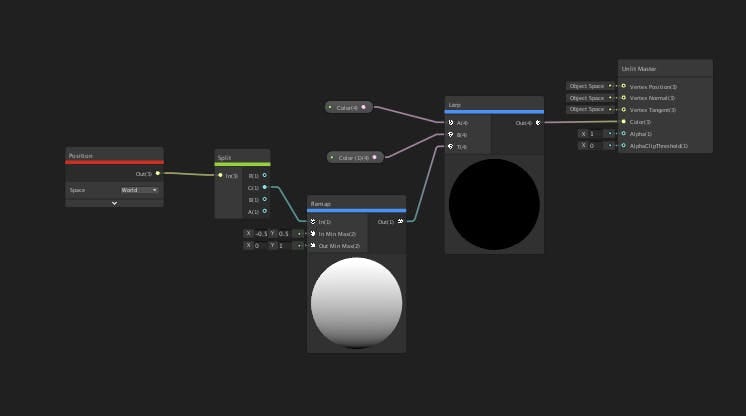
Shader Graph is not the only Visual Shader editor there are others like Shader Forge by Freya Holmer and Amplify Shader.
The Anatomy Of a Shader Object
Sub Shaders
A shader can contain one or more sub-shaders. Each sub-shader lets you define different GPU settings and shader programs for different hardware, render pipelines, and runtime settings.
Culling
When we have a 3d model of a cube we know that the sides of the cube which are facing away from our view can't be seen so why bother to draw them? This is where culling (also known as back face culling) comes in, it’s the act of reducing the number of vertices that need to be rendered. This is used as an optimization.
There are several culling tags:
- Back - Don’t render polygons facing away from the viewer (default).
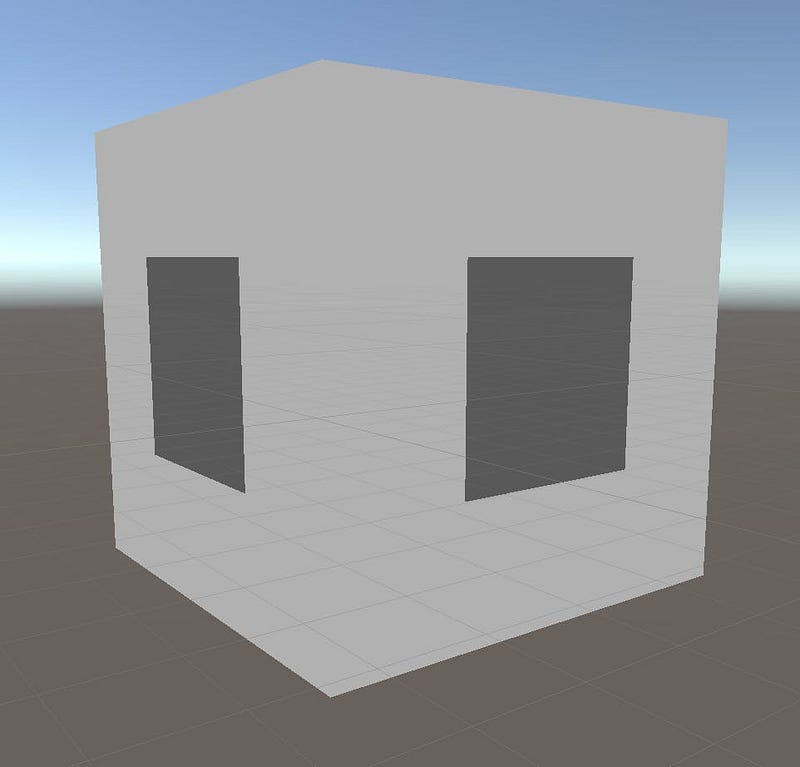
- Front - Don’t render polygons facing toward the viewer. Used for turning objects inside-out.
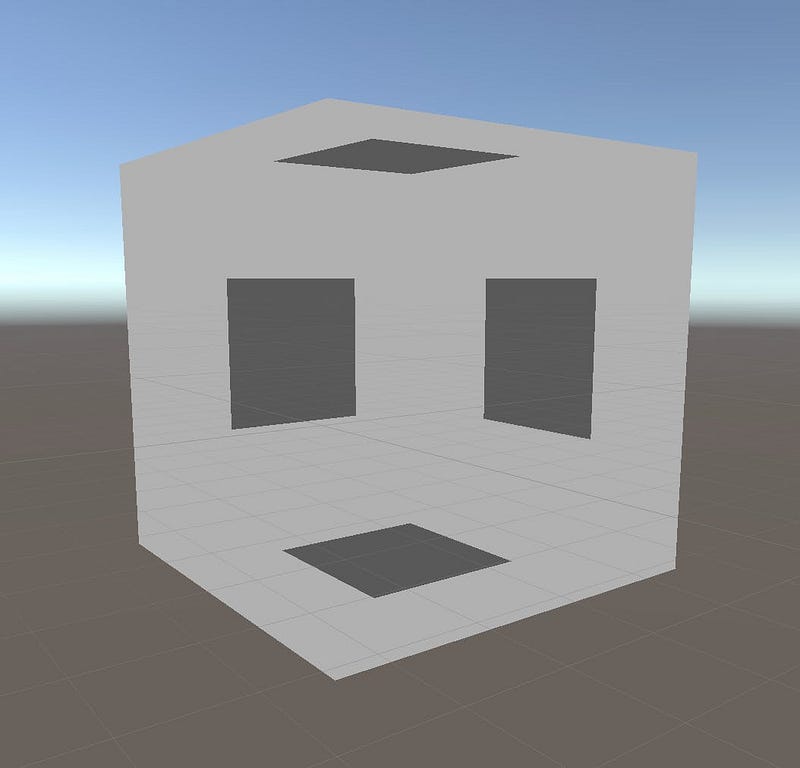
- Off - Disables culling, all faces are drawn. Used for special effects.
In opaque geometry, anything rendered between 0–2500 is rendered front to back, this way the ZTest is rejecting pixels where the depth has already been written to. This is to reduce the fill rate.
And finally, Unity’s sorting doesn’t always sort how you expect due to batching, bounds calculations, and some other Unity oddness.
Shader Pass
A shader can have one or more passes. A pass is a request to draw an image using the data that is passed to the shader. Each pass receives the content of the previous pass.
In cases like an outline shader, we want to have more than one pass. One to draw the object and another one to draw the outline which is the object larger in a single color and rendering its front face.
Shader graph doesn’t support multi-pass shaders.
Keywords
Keywords are useful for many reasons, such as:
- Creating shaders with features that you can turn on or off for each Material instance.
- Creating shaders with features that behave differently on certain platforms.
- Creating shaders that scale in complexity based on various conditions.
Shader Performance
There are several ways to optimize your shaders. To understand what will optimize our shader we need to remember that a shader is a function that does calculations, the less complex the calculation the faster and more optimized it will be.
Precision
The first thing we can do to reduce the complexity of the calculation reduces the precision of the calculations. Shaders do math calculations on floating point numbers. We can choose the precision of the calculations. We can choose either floating precision which uses 32 bits or half precision which for its name’s sake is 16 bits. Using the half-precision is faster due to improved GPU register allocation or due to “fast path” execution units for some lower precision math operations. The use of lower precision uses less power from the GPU and can increase battery life. If you build for PC in unity it makes no difference what precision you choose as it will always compute to 32-bit precision. The place where the precision does matter is on mobile GPUs.
Expensive functions
Some math mathematical operations are very expensive. For example pow, exp, log, cos, sin, and tan. These are Transcendental mathematical functions that may look simple but are very complex to calculate. As we said the less complex the calculation is the faster the shader, so avoid functions like this when possible. A trick that can be used as an alternative is baking calculations by looking up tables on textures.
Branches are expensive
Shader programs are stupid in a sense. In C# if you have an “if else” statement you only calculate either the if logic or the else logic, but shaders will calculate both and only use the result that is needed. This means that branches in shaders are expensive. To avoid this we can use Keywords. Keywords look like branches but what they do is create shader variants. One shader variant for the if true and one for the if false in this case.