🌑Introduction
Creating games is extremely hard. The choices we take with our project structure can make it even harder. We can quickly find our project in a state that is unscalable and difficult to change and extend. It’s a common problem that all game developers face. In this blog post, I would like to introduce you to a structural solution that has proven itself in several personal projects and multiple enterprise-level ones as well. By adopting this project architecture you will be able to create games that are resilient to changes and easier to maintain.
🌒Structure based on types
The purpose of a folder is to create order. But to do so it has to be used correctly. Folders are the glue that holds the structure of our projects. When you begin a new project you need to ask yourself what problems you want to avoid with the structure of your project. It’s important to make these choices early on because the longer you delay them the harder it will be to change later.
When working on my first project, I looked at a few unity tutorials and decided to structure the folders by their content type. All the animation clips were placed in the animation folder, all the scripts were in the scripts folder, and so on. There were special examples like theresourcesfolder but other than that the pattern persisted.
The folder structure looked something like this:
<Animations>
<Audio>
<Fonts>
<Materials>
<Models>
<Plugins>
<Prefabs>
<Resources>
<Scenes>
<Scripts>
	<Commands>
	<Controlers>
	<Models>
	<Signals>
	<Views>
<Sprites>
<Textures>
It worked fine in a small school project. Later on, when I started working in a professional capacity I encountered similar folder structures. But the folder structure I used in my school project didn’t scale well. What works on a small project doesn’t always translate well to a big one.
So what is wrong with a structure based on types?
🌓What’s wrong with it?
When I was presented with the opportunity to start a project from scratch I was delighted, I could finally build a project that wouldn’t have the pitfalls the previous ones had. I could structure the project as I pleased. So I sat down and started to list the many problems that the former projects have presented to me.
🧭Complex Project navigation, Navigating the type-based structure in small projects was easy, unfortunately, as projects become bigger it became a nightmare to traverse them. When a new team member joined the project he couldn’t tell what it was from looking at the project structure. The onboarding for the project was very difficult and confusing. What is this project? What feature does it have? Where do I place new files I create? Where do I find the files I’m looking for? Where are these files used?
🍝Code Coupling, The structure of the project leads to coupling. You might think that the two have nothing to do with each other but you would be mistaken. Since the folders don’t describe the dependencies of the project nobody knows the dependencies and quickly you find yourself in a place where everything is coupled and no way of enforcing the order. When you change code in one feature another one breaks. You get merge conflicts when people don’t even work on the same features. And in the end, it causes tons and tons of bugs and headaches.
🐢Slow work iterations, In Unity, it’s a best practice to use more than one scene at a time. This way you can separate your features between the different scenes. Each time you need a new one you can add it additivelyIf you happen to be using a single scene in your game I urge you to reconsider.
Unfortunately, as a result of the coupling in the code, there was no way of opening a single scene and working on it alone. This was because each scene had dependencies on other scenes. Eventually, all scenes are dependent on each other. If you try to open a scene you would be faced with tens of exceptions and the scene wouldn’t load properly. That meant that if I created a scene I would have to load the whole game. This would cause long work iterations. The larger the project became the more time-consuming it became.
🗑Hard to discard features, Because the feature files were scattered around the project, I had no way of knowing what files were unique to the feature. That meant that either I deleted something that was used in other features and broke them by accident, or I had to leave a ton of junk in the project that wasn’t used but no one had any way of knowing.
😨Fear of change, Changing files like materials, animation, sprites, and others would cause continuous bugs. This was because there was no way to know in what features the files were used. So you would change a material that was used on a popup and a particle effect would break. It was like playing whack-a-mole. Sometimes bugs caused by this would persist for weeks because they were hard to spot.
💱Hard to share code between projects, As a result of this mess, code isn’t easily extractable from the project. Moreover, this structure doesn’t lend itself well to causing the team to create code with the thought of sharing it with other projects and making it decoupled from the game itself.
🖼Hard to manage UI Atlases, Atlases are how we improve the UI performance. Atlases have a size limit so you can't just place all the sprites in the project in a single atlas and be done with it. You need to create several or tens of atlases wisely to get the best bang for your buck. But since you have no way of knowing where your sprites are used in the project this would cause several problems.
- There was no simple way of choosing what sprites should be atlased together.
- And even when you did think you knew, then you would create an atlas and discover later on that putting sprite “x” in that atlas caused more draw calls elsewhere since the sprite was used in several other places with a combination of different sprites than those in the atlas you created.
- In places, only a single sprite in a large atlas was used causing big textures to be loaded into memory even though there was no actual need for 99% of its content.
🧘The project is not flexible to change, As an aggregation of all of the above, the project was not malleable and broke easily and frequently.
🌔How do we define a better structure
If we look at the root cause of these problems We can see that the structure of the project is the main culprit. The question which we are left with is how do we structure our project in a way that eliminates these problems. If we invert the problems we raised we get a list of requirements for the structure we want:
- 🧭Easy Project navigation
- 🍝Decoupled Code
- 🐢Faster work Iterations
- 🗑Easy to discard features
- 💱Easy to share code between projects
- 😨No Fear of change
- 🖼Easy to manage UI Atlases
- 🧘Project flexible to change
🌕Domain-based structure
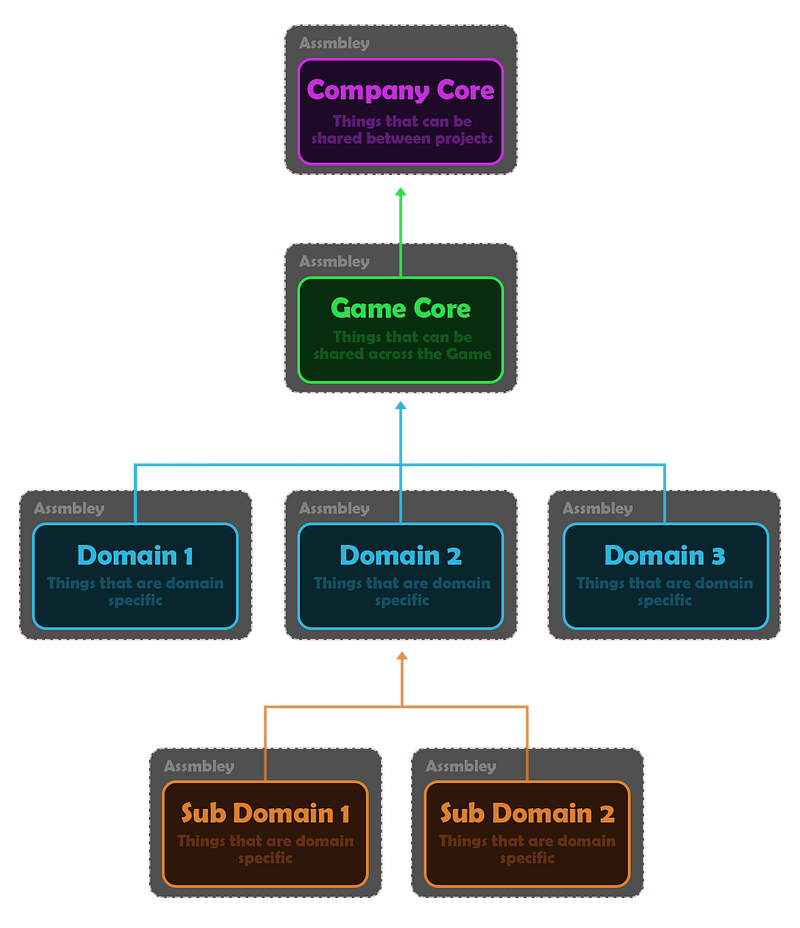
The solution that arose is a domain-based structure. Instead of separating the project into types, we can separate it into domains. A domain is an area of the project that has a shared purpose. We have three levels of domains, and each domain should only be dependent on domains of a higher level:
1️⃣Company Core Domain:
The first level is for things that can be used across multiple projects. This domain should not be dependent on any other domain. For example an input lock system. This is a system that can be made generic and used across several different projects. So you only need to write it once and then you can use it again in all your projects.
2️⃣Game Core Domain:
The second level is for things that are used across the game. This domain should only be dependent on the Company's Core Domain. This for example would be game-specific services. This services logic is unique to the game and cant be shared with other projects but it will be used across many features of the game.
3️⃣Inner Game Domains:
The third level is for things that are feature specific. These domains should each only be dependent on the Game Core Domain and the Company Core Domain. For example, if you have a Hud that displays your experience and the gold in your game, there is no reason for it to know of the Map feature you have in your game. Each is its own domain. I’ll note that as the project scales you might want to split up Domains to have sub-domains. That is if a domain can be separated into several inner parts you can separate it inward into several subdomains which don’t know about each other.
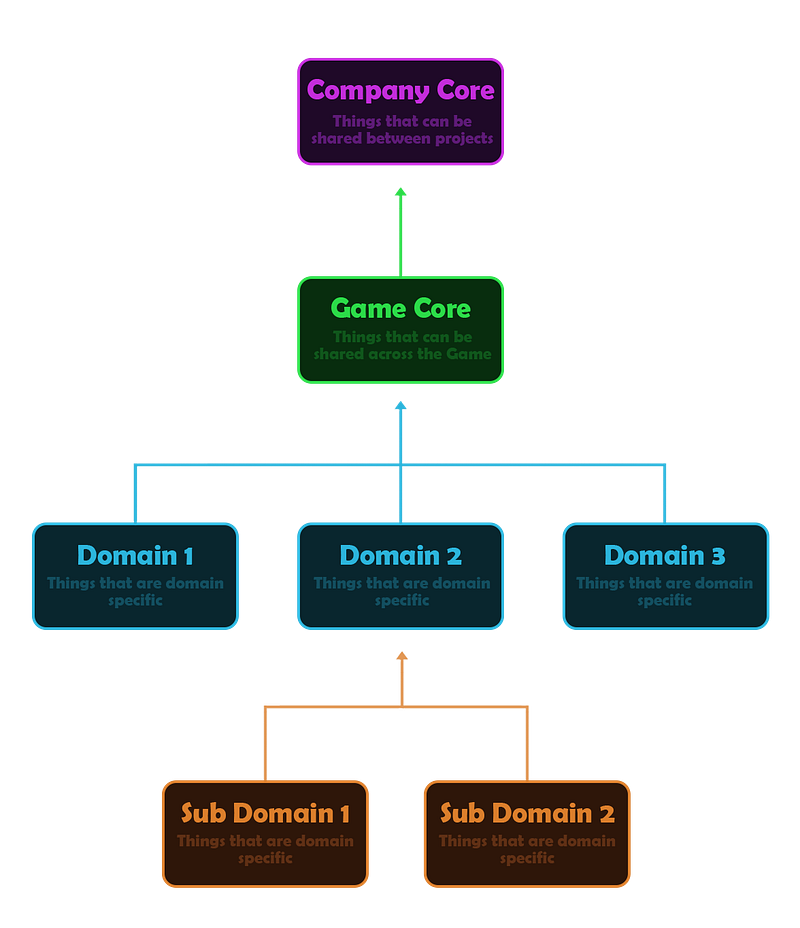
The folder structure is similar to before. We still separate all the assets into folders by their type, but now we do so in chunks. Each chunk has a logical reason for existing and all its assets are relevant to each other. The smaller chunks are easier to maintain and follow and give a coherent structure to the project, one that describes the project and is easy to follow and grasp.
<CompanyCore>
		<Animations>
		<Audio>
		.
		.
		.
		<Scripts>
		<Sprites>
		<Textures>
		<GameCore>
				<Animations>
				<Audio>
				.
				.
				.
				<Scripts>
				<Sprites>
				<Textures>
				<SubDomains>
						<Domain1>
								<Animations>
								<Audio>
								.
								.
								.
								<Scripts>
								<Sprites>
								<Textures>
								<SubDomains>
										<SubDomain1>
										<SubDomain2>
						<Domain2>
								<Animations>
								<Audio>
								.
								.
								.
								<Scripts>
								<Sprites>
								<Textures>
🌖How do the different domains interact?
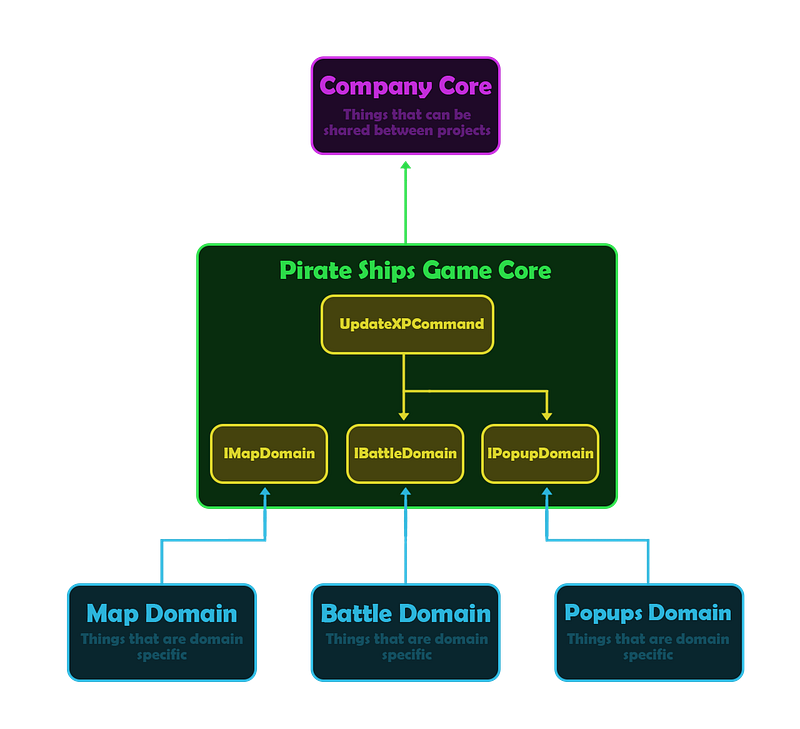
Now that we grasp the structure let’s talk about how the different domains interact with each other. Let’s look at an example. Let’s say we’re building a pirate game, where you sail ships and wage war on the open sea. Our game currently has several features. A map that describes our place in the world, a battle area where we see our ships sailing in the water and wage war on others, and a popup mechanism that we use to display different popups as needed in the game.
Let’s say we want to update the player's XP, which will increase the player’s level, which will open a level-up popup. The issue is that when well look at our diagram we see that the 🗡Battle Domain and the 📳Popup Domain do not know about each other. Moreover, the 🍏Pirate Ships Game Core Domain doesn’t know about either one of those domains it only knows about the 🫐Company Core Domain.
To amend this issue we can create an interface for each domain. These interfaces will sit one level above these domains in the 🍏Game Core Domain. This way the 🍏Game Core Domain can communicate with the subdomains without actually interacting with them directly or knowing about their concrete implementations, or referencing anything inside the subdomains. Each domain is responsible to implement its interface. Since the interfaces are inside the 🍏Game Core Domain it has access to them, even though it knows nothing about the domains that implement them. In the diagram below you can see that the flow of control is still in one direction.
There are many ways of making the domains interact with each other, my preferred method is the command pattern. We can create an “Update XPCommand” inside the 🍏Game Core Domain. The “Update XP Command” will change the XP and open the level-up popup by accessing the interfaces of the different domains.
🌗How do we maintain the structure?
Like all good things in life keeping this structure maintained takes effort and discipline. Each time you add more code or assets you’ll have to think about how do those things relate to the structure. When a domain becomes too big you might look at it and realize that it should be separated into subdomains. When you add a new feature you need to consider what assets it needs. let’s look at an example.
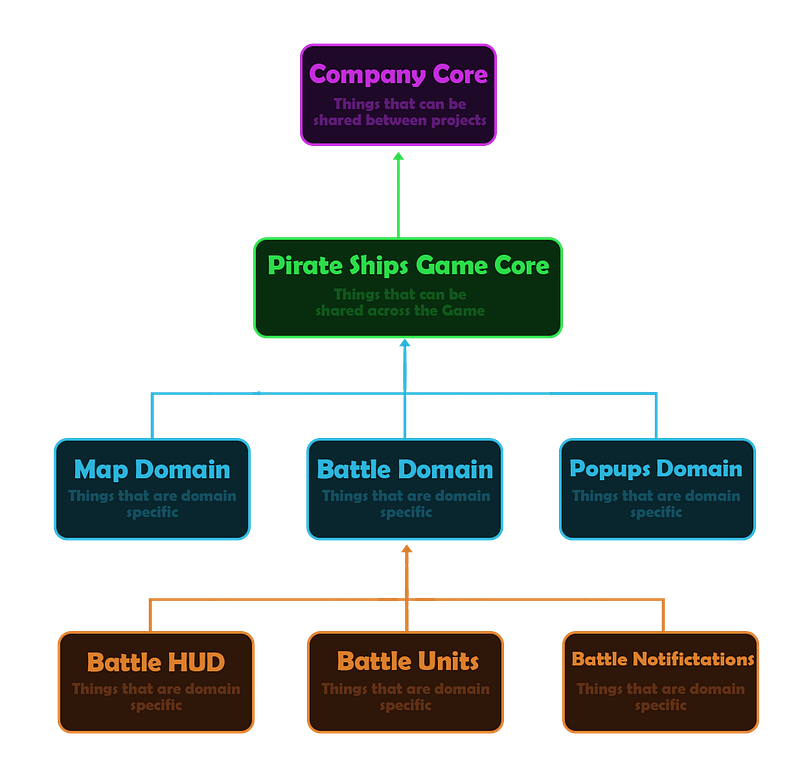
In our example, as we worked on the battle domain we realized that it should be separated into two subdomains ⚜Battle Hud and 🧙Battle Units. Each is responsible for its own things and they have no reason to know about each other directly. Then we start working on a new feature called battle notifications. We create a new subdomain for it because we already know that it’s not dependent on the other subdomains. But then we realize that some of the ⚜Battle Hud domain assets are needed for the 🔴Battle Notification domain. What a pickle. If we are lazy we just go ahead and use them directly. But this goes against everything we are trying to do here. This causes dependencies between the two domains. We have two options. One duplicates the assets, which in some cases might be the correct course of action. But as developers, we hate repeating ourselves and like to keep things DRY. So if we don’t want to duplicate the assets but still keep our structure intact we can just move the shared assets one level above to the 🗡Battle Domain.
The beauty of working like this is that when we make changes we always know what can be affected as a result of those changes. If we change an asset in 🗡Battle Domain we know that the only places in the project that can be affected are in that domain and its subdomains. This way after making changes we can be sure what parts of the project we need to go over and make sure that nothing is broken. The only drawback is that we can’t be sure which subdomains use the assets that are in the 🗡Battle Domain. In this case, the 🧙Battle Units domain doesn’t use the assets we talked about, but by looking at the structure you can’t be sure.
🌘How do we enforce the structure?
So ordering the files this way alone won’t save us from the gods of chaos, we need to somehow enforce this order. Even with great architecture, the effects of entropy are real. No matter how good the structure of your project is, over time, your project will become disorganized. You must continuously maintain the architecture and try to enforce it. The larger the project is the more hands will touch it. The more hands that touch it the harder enforcing it is. To make maintaining the architecture simpler we can do things to force the people who work on the project to adhere to its structure.
Enforcing order in the code
We want our code to be as organized as possible. The order we have created by separating it in the folder structure is awesome and will go a long way in fighting the disorganization but it’s not enough.
The reason why it is lacking is that nothing is stopping an undisciplined programmer from taking a script from Battle Domain and referencing Popups Domain. This would be catastrophic. Why? Because now we have broken the order. We have specifically separated the two domains because they shouldn’t be coupled together and yet now someone has broken that separation.
So how do we make sure that no one breaks our order?
We use Assembly definitions.By defining assemblies, scripts in the assemblies you define only have access to scripts in those other assemblies that you designate. What this essentially means is that if we can make it so no script from one domain can access scripts from other domains! If a programmer tries to access one from the other it will appear to him that the script he is looking for doesn’t exist.
So in this way, we will make sure to put Assemblies in all the domain folders, all subdomain folders, the core game folder, and cross-project folder, and so on.
Enforcing order in assets
Unfortunately, Assembly Definitions do not enforce anything which isn’t a script. This leaves us with a problem. Let’s say we have a material that is used for Domain1. In our new way of thinking it should only be used in Domain1 or one of its subdomains. This way we have an understanding of the usage of our assets. If we change this material we know that we can only affect this domain or one of its sub-domains but the rest of the project is encapsulated from change.
How do we enforce this? The answer is not as clean as I would like but it’s as good a solution as I have found. We will use the Smurf Naming convention on assets, that is if we have a material in Domain1 we will call it Domain1_MaterialName. This is ugly but this has a couple of benefits.
- One searching for assets becomes easier because if you search for an asset in a certain domain you already know its prefix.
- Two we can now write automation scripts that go over our folders and prefabs and make sure these prefabs and scenes only use assets that belong to their domain or parent domains.
🌑Reexamining the requirements
🧭Easy Project navigation, The structure speaks for itself. Just by looking at the project structure, you will be able to tell what features it has and where things should go. A new team member should be easily able to navigate the project domains and see where to put things.
🍝Decoupled Code, By separating the code into domains and then wrapping them up in assemblies we make the code as separated as possible. There literally can be no dependencies between the different parts of the project. Well not unless someone just gives the domains assemblies access to each other (totally not based on a true story).
🐢Faster work Iterations, Since we now have no dependencies between domains. We can have a scene for each domain and the only things it should depend on are the game core and the company core. So you should have no problem running one domain’s scene without having to load other domain scenes. This way you can check that a single feature is working without loading the entire game.
🗑Easy to discard features, There should now be very clear points of access to a domain. And the domain has no access to other domains. So if you decide to remove that domain you can just delete the folder. All the assets in that folder should not have been used by any other domain. The only code that will break is the few access points you had in the game core.
😨No Fear of change, This is mostly the same as “easy to discard a feature”. If you change something in a domain then you know that you can only affect things in that domain or its subdomains. This is also helpful for QA, since you know if you only changed things in a specific domain you only need to check that domain and its children.
🖼Easy to manage UI Atlases, We now know by the placement of the assets where it is used. And so we can create better atlases.
💱Easy to share code between projects, Since the Company Core can have no dependencies on the rest of the project you can ensure that everything inside it can be used across other projects. Each time you write new functionalities that are not dependent on the game you can put them in the company core and just like that they should be ready for other projects’ use.
🧘The Project is flexible to change, As an aggregation of all of the above, the project can be much easier to change and manipulate.
🌚Summary
I’ve been developing games professionally since 2016 and I can speak for myself by saying that once I began building my projects in this way it feels impossible to go back. I hope that after reading this you will give it a try and hopefully it will make your life easier. Making games is extremely difficult, so use your energy to make games, and not fight your codebase. Even though working in this way requires maintenance and discipline it is well worth the effort, and in a short time, you will be able to rip the rewards, by doing things quicker and saving yourself headaches. Thank you for taking the time for reading this write-up. If you have any questions feel free to ask.