Handling complex inheritance hierarchies in Unity's serialization system is a recurring challenge in production game development. When you need to serialize polymorphic objects, objects that share a base type but have different implementations, Unity's default serialization system can feel limiting.
The Challenge
Unity's serialization system was designed for simplicity and performance, but it struggles with polymorphism out of the box. When you have a base class or interface and multiple derived types, you need a strategy to persist that data while maintaining type information.
Four Approaches
This article compares four different approaches to serializing polymorphic objects in Unity:
- Monolithic Classes - Using a single class with all possible fields
- Individual ScriptableObjects - Separate assets for each type
- SerializeReference - Unity's built-in attribute for polymorphic serialization
- Hybrid Solutions - Combining approaches for optimal results
Each approach has trade-offs in terms of Inspector usability, performance, maintainability, and scalability.

You’re making a card game about a goblin developers struggling with bugs and deadlines. Your “Coffee” card should give your goblin focus while also causing anxiety (because, well, it’s coffee). You’ve built a clean system where each card has a list of actions, some reduce anxiety, others add focus, and a few apply debuffs like “Call of the Bathroom.”
Your polymorphic design is solid. Each action type has its own class with specific properties. The code compiles beautifully. Then you try to configure your cards in Unity’s inspector.
TheListfield appears, but then the reality hits… Unity can't show you the individual action properties. You’re left staring at a list of empty object slots, unable to set up even a simple coffee card. How do you serialize a list of polymorphic objects on a ScriptableObject without losing your sanity?
Approach 1: The Monolithic Class
The traditional approach: abandon polymorphism entirely and cram everything into one massive class.
[CreateAssetMenu(fileName = "CardConfig", menuName = "Cards/CardConfig")]
public class CardConfig : ScriptableObject
{
    [SerializeField] private string cardName;
    [SerializeField] private int energyCost;
    [SerializeField] private List<CardAction> actions;
}

[Serializable]
public class CardAction
{
    [SerializeField] private CardActionType actionType;

    // Damage action fields
    [SerializeField, ShowIf("actionType", CardActionType.Damage)] private int damageAmount;
    [SerializeField, ShowIf("actionType", CardActionType.Damage)] private DamageType damageType;

    // Healing action fields
    [SerializeField, ShowIf("actionType", CardActionType.Healing)] private int healAmount;
    [SerializeField, ShowIf("actionType", CardActionType.Healing)] private bool canOverheal;

    // Energy action fields
    [SerializeField, ShowIf("actionType", CardActionType.Energy)] private int energyGain;
    [SerializeField, ShowIf("actionType", CardActionType.Energy)] private bool isPermanent;

    // And so on for every action type...
}
This is what it looks like without the Show If attributes …

This approach violates the Single Responsibility Principle so hard it should be a crime. Every time you add a new action type, you modify this class. Your switch statement grows longer. Your inspector becomes cluttered with irrelevant fields. Runtime performance suffers from type checking.
But it works. And sometimes, when deadlines loom and entropy presses in, “it works” is enough.
Approach 2: Individual ScriptableObjects
Make each action type its own ScriptableObject. Clean architecture at the cost of workflow hell.
// Base class
public abstract class CardAction : ScriptableObject
{
    public abstract void Execute();
}

// Derived types
[CreateAssetMenu(menuName = "Actions/Damage Action")]
public class DamageAction : CardAction
{
    [SerializeField] private int damageAmount;
    [SerializeField] private DamageType damageType;

    public override void Execute() { /* damage logic */ }
}

[CreateAssetMenu(menuName = "Actions/Heal Action")]
public class HealAction : CardAction
{
    [SerializeField] private int healAmount;
    [SerializeField] private bool canOverheal;

    public override void Execute() { /* heal logic */ }
}

//...
// Other Card Actions
//...

// CardConfig references these
[CreateAssetMenu(fileName = "CardConfig", menuName = "Cards/CardConfig")]
public class CardConfig : ScriptableObject
{
    [SerializeField] private string cardName;
    [SerializeField] private int energyCost;
    [SerializeField] private List<CardAction> actions; // References to other ScriptableObjects
}
This is what it looks like:
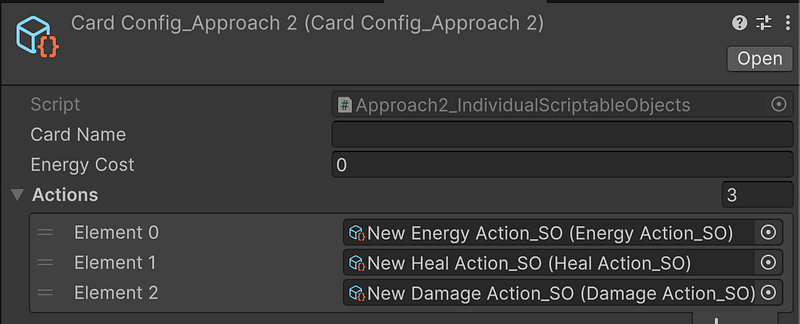
Your architecture is beautiful. Each action is focused and maintainable. True polymorphism works perfectly. Version control loves you.
Your designers hate you.
They spend their days navigating between dozens of tiny asset files. Want to configure a card? Open the card asset, note down the action names, hunt through folders to find each action asset, edit them individually, then go back to the card. Inline editing? Forget about it.
When to use:You want a good, “SOLID” solution, and you hate whoever needs to do the configuration.
Approach 3: SerializeReference
Unity 2019.3 brought salvation: [SerializeReference]. True polymorphic serialization with inline editing. The promised land.
// Base class (regular class, not ScriptableObject)
[Serializable]
public abstract class CardAction
{
    public abstract CardActionType ActionType { get; }
    public abstract void Execute();
}

// Derived types
[Serializable]
public class DamageAction : CardAction
{
    [SerializeField] private int damageAmount;
    [SerializeField] private DamageType damageType;

    public override CardActionType ActionType => CardActionType.Damage;
    public override void Execute() { /* damage logic */ }
}

// CardConfig with the magic attribute
[CreateAssetMenu(fileName = "CardConfig", menuName = "Cards/CardConfig")]
public class CardConfig : ScriptableObject
{
    [SerializeField] private string cardName;
    [SerializeField] private int energyCost;
    [SerializeReference] private List<CardAction> actions; // ✨ Magic happens here

    public void ExecuteActions()
    {
        foreach (var action in actions)
        {
            action.Execute(); // True polymorphism!
        }
    }
}
Here is what it looks like

Understanding SerializeReference
SerializeReference fundamentally changes how Unity handles serialization. Instead of serializing objects by value (copying all their data), it serializes them by reference while preserving type information.
Here’s what Unity stores internally:
references:
  version: 2
  RefIds:
  - rid: 6603490093986218049
    type: {class: AddFocusAction, ns: Scripts.Cards, asm: Assembly-CSharp}
    data:
      amount: 3
  - rid: 6603490093986218050
    type: {class: GainAnxietyAction, ns: Scripts.Cards, asm: Assembly-CSharp}
    data:
      amount: 2
  - rid: 6603490093986218052
    type: {class: ApplyDebuffAction, ns: Scripts.Cards, asm: Assembly-CSharp}
    data:
      debuffName: Call of the Bathroom
      duration: 3
Unity assigns each SerializeReference object a unique ID and stores the full type name (class, namespace, assembly) to recreate the correct type during deserialization.
This enables:
- True polymorphism, each object retains its runtime type
- Inline editing, edit derived class fields directly in the inspector
- Object identity, references are preserved, not copied
- Clean architecture, separate classes for separate concerns
But there’s a catch. There’s always a catch.
The SerializeReference Fragility Problem
SerializeReference is powerful but fragile. Unity stores type names as strings. If it can’t find the exact type during deserialization, references become null.Silently.
What breaks everything:
- Renaming classes (
DamageAction→DamageCardAction) - Changing namespaces (
MyGame.Actions→MyGame.CardSystem.Actions) - Moving between Assembly Definitions
- Renaming serialized fields (without
[FormerlySerializedAs])
One careless refactor can destroy all your data with no warning. Your carefully configured cards become lists of null references overnight.
You’ll also need custom editors for a good user experience. Unity’s built-in inspector can’t handle SerializeReference fields elegantly on its own.
When to use:When you're part of a small dev team that wants minimal asset hell, and you know you're not going to do many refactors.
Approach 4: The Hybrid Solution
What if you could have clean ScriptableObject architecture AND inline editing? You can.
This approach uses individual ScriptableObjects but with a custom editor that creates the illusion of inline editing. You get the best of both worlds.
[CustomEditor(typeof(CardConfig))]
public class CardConfigEditor : UnityEditor.Editor
{
    private readonly Dictionary<CardAction, SerializedObject> _actionSerializedObjects = new();

    public override VisualElement CreateInspectorGUI()
    {
        var root = new VisualElement();

        // Standard card fields
        CreateCoreFields(root);

        // Magic: inline editing of referenced ScriptableObjects
        CreateInlineActionEditor(root);

        return root;
    }

    private VisualElement CreateInlineActionEditor(VisualElement root)
    {
        var actionsProperty = serializedObject.FindProperty("actions");

        for (int i = 0; i < actionsProperty.arraySize; i++)
        {
            var actionRef = actionsProperty.GetArrayElementAtIndex(i);
            var actionObject = actionRef.objectReferenceValue as CardAction;

            if (actionObject != null)
            {
                // Create SerializedObject for the referenced asset
                var serializedAction = new SerializedObject(actionObject);

                // Display its properties inline
                var actionEditor = CreateInlinePropertyFields(serializedAction);
                root.Add(actionEditor);
            }
        }

        return root;
    }
}
Here is what it looks like:

This custom editor creates SerializedObject wrappers for each referenced action and displays their properties inline. When you edit an action’s properties, you’re actually editing the individual asset file, but it feels like everything is in one place.
When to use:Teams that want clean architecture without workflow sacrifices, where refactoring safety is paramount. And that have the time to create custom editors.
The Entropy Management Principle
Each approach represents a different strategy for managing complexity in your Unity project. Monolithic classes concentrate complexity in one place but violate clean code principles. Individual ScriptableObjects distribute complexity across many files but burden the workflow. SerializeReference attempts to eliminate complexity but introduces fragility. The hybrid approach adds editor complexity to reduce workflow complexity.
There’s no perfect solution, only different places to put the pain. The key is choosing consciously based on your team’s strengths and project constraints, rather than stumbling into a pattern by accident.
Unity’s serialization limitations force us to make trade-offs. Understanding these trade-offs helps us fight entropy more effectively, making informed decisions about where to place complexity rather than letting it spread chaos throughout our codebase.
The next time Unity’s serializer breaks your beautiful polymorphic design, you’ll know exactly which weapon to reach for.