In this post, we will explore how we can enhance our project by replacing events with the command pattern and incorporating asynchronous code. We will demonstrate how this approach can lead to code that is more clear, easy to maintain, and can ultimately reduce the number of bugs in our project.
Why are events horrible for complex sequences?
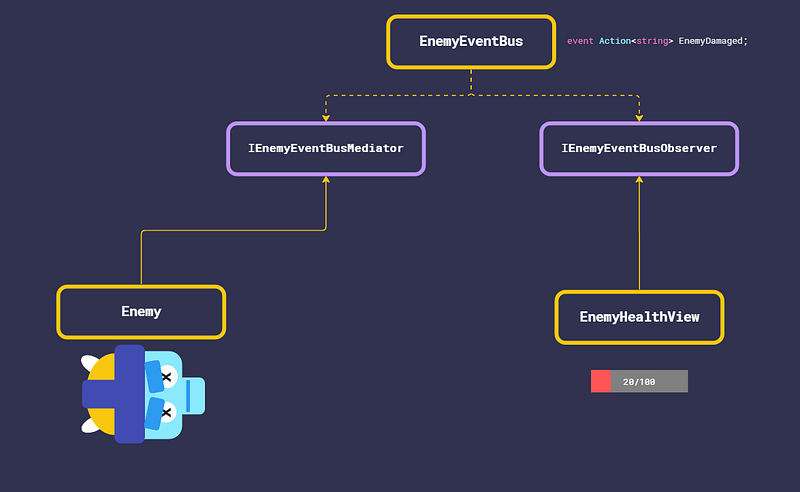
Events are a great way to communicate that some things have happened in the game. Let’s look at a classic example. If an enemy has been damaged, we will inform our event bus so whoever is listening to that event can now know that an enemy has been damaged or maybe even killed and do what it was waiting to do on this occasion.
In our case, we have a health bar that shows how much health the enemy has. When the enemy damaged event is raised the health bar which is listening to it will play an animation of the health lowering it. This is exactly what we want and it works great. But let’s zoom out a little.
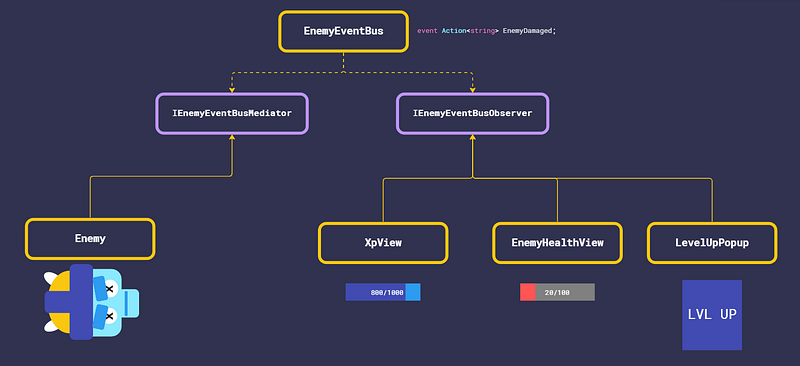
When the enemy dies, we want to give the player XP and update the XP view. In this case, the player has acquired enough XP to level up, so we want to display a level-up popup. However, this is where things start to become complicated.
If we simply listen to the event and trigger all the actions at once, we will have a chaotic sequence of events, confusing the player. Instead, we want to first show the enemy’s health lowering to zero, then display the player’s XP rising to 1000, and finally show the level-up popup. As it stands, this is difficult to implement.
We could have only the health bar listen to the event, then have the XP view listen to an event triggered by the health bar, and finally have the popup listen to an event triggered by the XP view. However, this creates a chain of events that is hard to follow. Alternatively, we could add a delay for each operation, but determining the appropriate delay time is a challenge. How much time should we wait? If the XP view requires a delay, how does it know how much time the health bar view animation will take and vice versa for the level-up popup?
Imagine that your boss comes over and says that this approach doesn’t look good. They want the XP update and health update visuals to run simultaneously and for the level-up popup to only display once both have been completed. However, both updates take different amounts of time. Now you must wait for both of them to finish, this is where you bend over into your keyboard and start crying.
I believe you are beginning to understand the issue. Although this example is straightforward, you will encounter much more complex scenarios in your game. The problem is that we are attempting to manage a sequence of events in the game, but the current implementation is decentralized and challenging to follow and maintain. To resolve this, we must find a way to organize and centralize the management of these events, allowing the various parts of the code to work together seamlessly.
What is the command pattern?
The Command pattern is a way of organizing code that separates the instructions for what needs to be done (the request) from the code that does it. This allows for more flexibility, like being able to delay or repeat the instructions, and also makes it easier to understand and change the code. The Command pattern also allows multiple different parts of the code to handle the same request, which makes the different parts less dependent on each other.
If we take a look at what a command looks like it's a class with an execute function:
public class Command
{
  public abstract void Execute();
}
Why should we use commands in sequences instead of events?
Our problem is that we need an orchestrator to handle the sequence and manage the different part of the code that is needed for that sequence. Imagine that your creating an event that has logic in it. In that way, we will be able to aggregate all the logic of the sequence into a single point in the code responsible for handling that sequence.
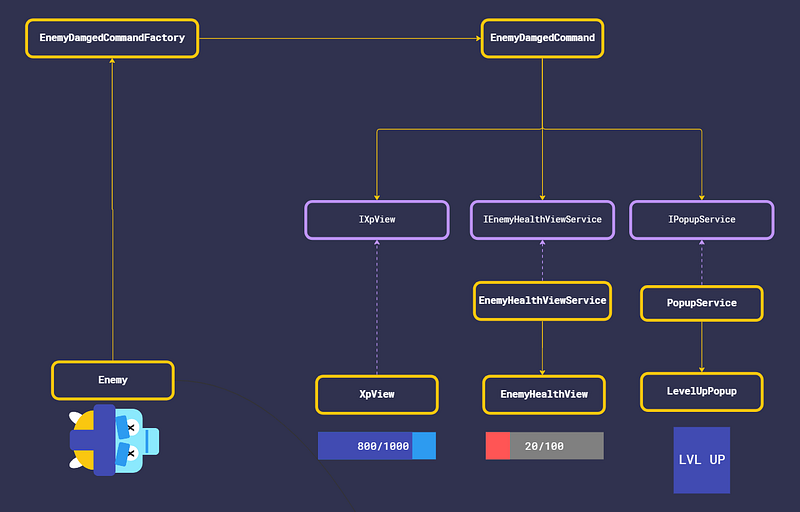
Let's take a look at some example code, in the class below we have an example of an enemy-damaged command. The enemy-damaged command knows about all the things relevant to the enemy-damaged sequence:
public class EnemyDamagedCommand : Command
{
 private EnemyDamagedCommandData _data;
 private EnemyService _enemyService;
 private XpView _xpView;
 private EnemyHealthViewService _enemyHealthViewService ;
 private popupService _popupServie;
 private PlayerLevelService _playerLevelService;

 public EnemyDamagedCommand(EnemyDamagedCommandData data, EnemyService enemyService,
     XpView xpView, EnemyHealthViewService enemyHealthViewService,
     PopupService popupServie, PlayerLevelService playerLevelService)
 {
  _data = data;
  _enemyService = enemyService;
  _xpView = xpView;
  _enemyHealthViewService = enemyHealthViewService;
  _popupServie = popupService;
  _playerLevelService = playerLevelService;
 }

 public async void Execute()
 {
   _enemyService.RemoveHealth(data.enemyId, data.damage);
   var enemyHealth = _enemyService.GetEnemyHealth(data.enemyId);
   await EnemyHealthViewService(data.enemyId).UpdateEnemyHealth(enemyHealth);

   var isEnemyDead = enemyHealth <= 0;
   if(isEnemyDead)
   {
      var killedEnemyXp = _enmeyService.GetEnemyXp(data.enemyId);
      var didLevelUp = _playerLevelService.addXP(killedEnemyXP)
      await _xpView.AddXpUpdatedAnimation(killedEnemyXP);

      if(didLevelUp)
      {
        await _popupService.Show(LevelUpPopup)
      }
   }
 }
}
If we follow its logic this is what it does:
- We update the enemy health data.
- update the enemy healthbar and wait until the animation finishs.
- We check if the enemy is dead.
- If the enemy is dead we get the xp that that enemy provides.
- updated the player xp data.
- Update the xp view and wait until the animation finishs.
- Check if the play leveled up
- if the player levelUp we open a level up popup and await until it is closed.
The code shows how we took control of the enemy-damaged sequence and encapsulated it in a command, making it easier to maintain and modify in the future. If you’re unfamiliar with asynchronous code, I recommend reading up on it. To effectively use async code in Unity, you’ll need the UniataskFramework by Yoshifumi Kawai, which integrates C# async code with the Unity engine.
How does the command get its dependencies?
In the diagram, we utilized a factory to generate the command, we did this for two reasons. Firstly, to decouple the command from its dependencies, avoiding unwanted knowledge transfer and unwanted coupling between separate components. Secondly, the factory enables command pooling, allowing us to reuse the commands after they are executed, thus reducing GC allocation.
When should we use events and when should we use commands?
So, now that we understand the power of using commands, should we abandon the use of events altogether? The answer is no. In simple cases where only a single element is listening to the event, there is no need to create a command. For instance, if a controller is listening to a button, an event is the most appropriate option. However, in cases where sequences of several interacting pieces of code are involved, it is best to create a command to coordinate the sequence.